

Making Laravel workers Go fast in AWS Lambda using RoadRunner
Why would you run your Laravel queue workers in Lambda?h1
AWS Lambda - is probably one of the best solutions for serverless out there.
Laravel workers are pretty good when you get started, but soon you’ll find yourself reaching for the button to scale them more and more. What if you could only pay for what you process and squeeze every performance out of that?
This is where SQS + Lambda comes in clutch.
In numbers, using SQS + Lambda we processed about 4 million messages daily between 120 queues with different priorities between them.
This is just a context piece, split from the main article since it wound up way too long. We have since moved back to more traditional workers, but we got allot of value out of the final worker architecture and maybe someone else will as well.
Laravel worker was simple but badh1
or why Laravel has a very shitty worker model
We are running on Laravel for most of our stuff.
Before moving to AWS Lambda, we were using
the very simple queue:work command in
combination with RabbitMq as a message broker:
php artisan queue:work --queue=queue1,queue2It worked when we had some tens of queues with a couple of messages each. But when we began increasing the number of queues and messages - it became quickly lacking. The Laravel worker model did not change much since then so with our current numbers it would’ve been suicide to use it.
Why is the Laravel worker model bad?h3
Not sure why this is not documented ANYWHERE. Sometimes, I feel a bit stupid since it feels like we were the only ones that found these
It mostly uses polling mechanisms to get messagesh3
This is bad for multiple reasons:
- It basically assasinates your message broker’s resources since for every message it would poll it. It would also block while it does so.
- In order for it to be less of a burden on the message broker (probably), the default is to sleep 1 second between messages. Yes, really!
Higher priority queues block lower priority queues completely and vice-versah3
Sometimes it could come in handy. But does not realistically work in practice. What happens is that if you listen for multiple queues (which uses polling, basically). It would poll the first queue and if it is empty, it would start polling the second queue until empty.
See the problem?
If it starts polling the second queue and some messages arrive on the first queue. You are stuck processing messages on the lower priority queue.
Also, even if there is only one message on the first queue - it would block the second queue completely even if the second one had hundreds of messages waiting.
Any error would kill the processh3
Probably the most annoying thing. If you had any exception or error, it would kill the process completely. Imagine having this in kubernetes and having the deployment’s pods light green/red like a Christmass tree. Not good.
Time for Lambda!h3
Because of the problems above, you would need to scale up the workers allot. I remember at some point, before moving to AWS Lambda, we were juggling hundreds of worker deployments (since each would need to listen to different queues). It was to say the least - a real nightmare.
Because of the constant errors, because of pods constantly switching out, nodes were always one step away from complete blockage.
These are some of the reasons why we needed to switch to something that we thought was better: serverless.
Initial Lambda worker modelh1
When we first started thinking about moving our workers to AWS Lambda … we didn’t even know if it would be possible with our PHP codebase.
First of all, we would need to move to using SQS instead of Amazon MQ. Then we would need to see if we could run PHP on AWS Lambda.
Existing solutionsh3
There were solutions already that sort of paved the way for us. Sadly, those solutions did not work for us.
We tried using Bref.sh - it worked on a toy project. But when trying to jam all of our codebase into a single Lambda layer … it got depressing really fast.
I’m sure that maybe for new smaller projects it could work great, but for us it just wasn’t feasible to split our entire codebase in order for our code + dependencies to fit inside a layer.
Therefore, we were left with no choice. We had to make a custom runtime for Lambda. Support for this was particularly good - surprising us in the process. AWS documentation was great - at least we knew where to start.
Creating a custom Lambda Runtimeh3
Props to AWS. It is so straight forward.
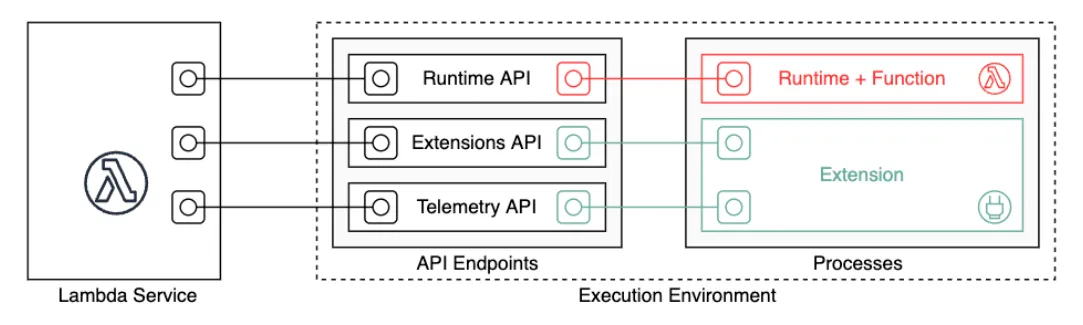
You can create any custom Lambda Runtimes with docker. A Lambda Runtime is the thing that:
- gets events from the Lambda Runtime API
- calls your code with data from the events
- pushes the responses to the events back to the Lambda Runtime API
So you could in theory use it to call any code - including PHP. :)
All you need to do is create a docker image with a process that polls the Lambda Runtime API. Easy enough.
First prototype - measuring thingsh3
Our first prototype kinda worked. We simply polled the Lambda Runtime API with a simple PHP Cli script and using the data from the events, simply instantiated a Laravel Worker that ran the event synchronosly and returned if it was a success or not.
Basic. But it gave us a chance to measure a couple of basic metrics:
- Throughput - aka how many msg/s can 1 lambda handle
This would give us at least an ideea about how much would Lambda scale with our then volume.
Just
hello-worldtype messages. Receive message, echo the message, move on.
- RAM increase / vCPU cores
By giving a Lambda more RAM, at some specific points it would get more CPU cores. We measured this extensively. You’ll see why in a bit.
First results - not good, not badh3
We first gave our basic lambda 128Mb RAM, which amounts to 0.5 vCPU (whatever this means). It was slow to say the least. On bigger messages it would simply OOM.
By increasing the RAM to 512Mb, we got better throughput. We could now process about 10 msg/s. Still slow especially in comparison to our more traditional workers that could process (when we disabled sleeping between polling) about 20 msg/s.
Anything more than 512Mb of RAM would not increase our throughput - there was no way of using those extra cores - just yet.
We setup some of our queues to use our new Lambda Runtime to measure more accurate real-life data. It was not terrible, but it was slower than a traditional worker - the scaling, though, would offset this quite a bit since it would be able to spin up more lambdas as the queues grew.
Scaling did not offset bad performance enoughh3
We put a limit of 100 concurrent invocations and went to sleep. The next day we had thousand of messages queued up. Shit.
What happened? So the lambda runtime gets about 10
events from the SQS queues per batch (we were
using FIFO) - and it waits for them to buffer up to batch window
seconds. Default window was 10 minutes. Yikes.
Setting the window to about 10-20 seconds proved to be way better. So again, we set this up and went to sleep. The next day, we still had hundreds of messages queued up - better, but still bad.
We now reached what was possible with a single PHP process inside the Lambda. Let me reiterate something here: Lambda is slower than traditional compute. The polling, the fractional vCPU, the RAM - all contribute to this. The advantage is that it can scale higher.
For now, we increased the concurent invocations to 200 and called it a day. We knew that the time would come for us to fix this. This number of concurrent invocations is more than double than the number of traditional workers replicas.
A win?h3
It was cheaper than having 6-7 beefy nodes for the worker replicas + Amazon MQ. About 60% cheaper. So we figured that it was a win - regardless.
Also, it solved our node instability issues (since there were no nodes to manage anymore). Less work for us - win.
And it forced us to make things idempotent and stateless - since we couldn’t rely anymore on jobs from the High priority queue getting processed before other lower priority queues. Hence, we also solved how our platform handles state.
We still had issues regarding the high concurrency number of the lambdas because of the not so great performance - but these would soon be solved.
Final Lambda worker modelh1
As mentioned before - after 512Mb of RAM the effects of the vCPU increases were unnoticeable. Especially because we couldn’t take advantage of multiple cores.
Fortunately, the PHP community really improved on this aspect - by a large margin! I was beginning to hear more and more about async php. Would it be possible to use this for our problems?
Swoole vs Roadrunnerh3
There were a couple solutions that I kept hearing about. I did not know anything about them, but I found the concepts fascinating. Both were promising higher PHP code performance by making IO async (Swoole) or by making more performant PHP process managers (Roadrunner).
Gave Swoole a try back then. So confusing. There was Swoole and OpenSwoole. One had english documentation, but poor one at that. One had chinese documentation, but pretty extensive. The async part looks cool - but still cannot see a way to properly use it with our codebase.
I thought Roadrunner was very cool. Written in Go, it could spawn PHP processes very efficiently by making them share their initial memory. Processes could also communicate with the Roadrunner process via sockets. I found this to be best suited for us - we could contain RAM, but scale up to the number of cores of the Lambda.
RoadRunner Workerh3
Our first RoadRunner worker architecture - proved to be a huge success.
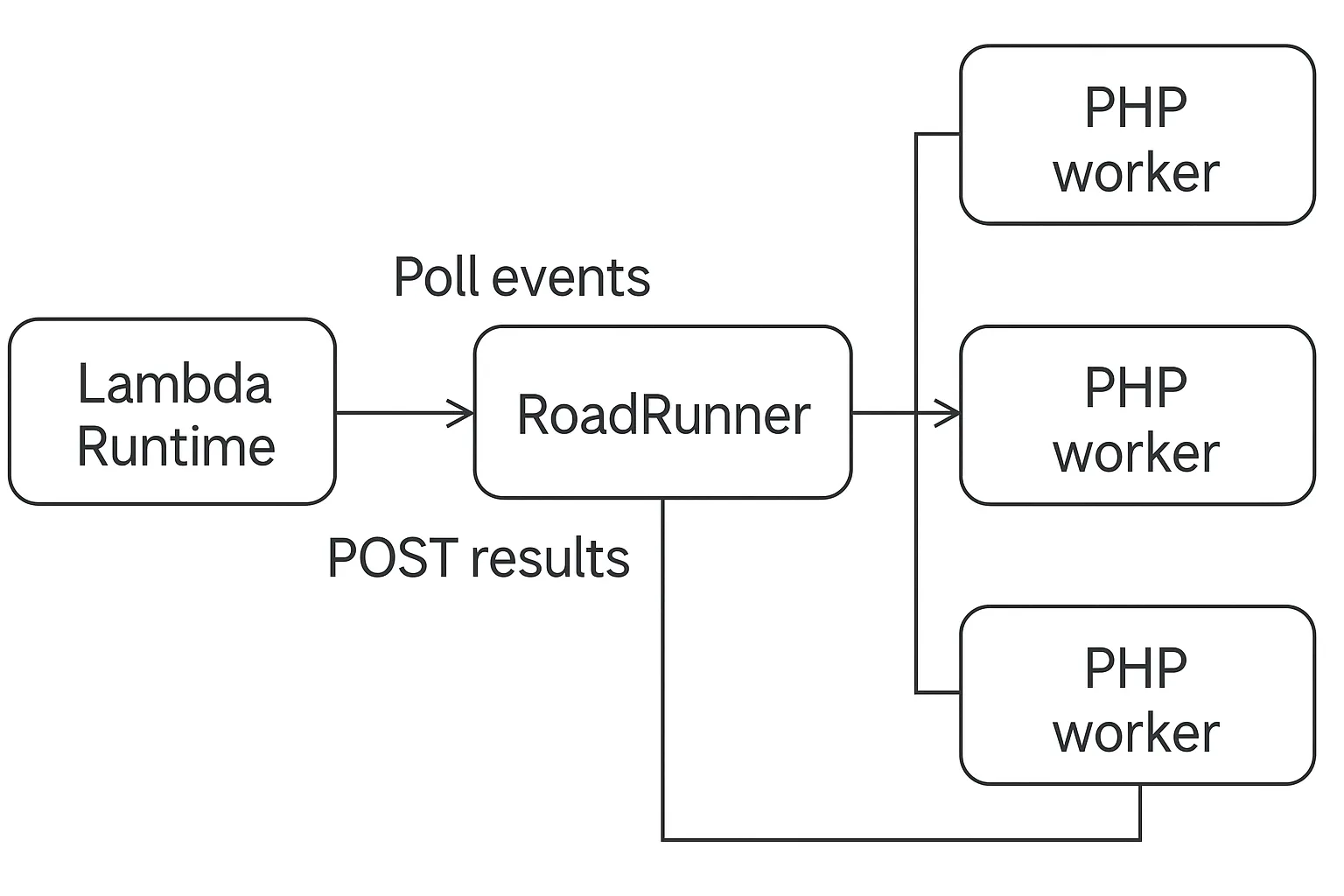
The way it worked was that we created a small RoadRunner plugin that polled the Lambda Runtime API for new events. It would then send the events to one or more PHP worker processes. It would wait for the results and then POST them back to the Lambda Runtime API.
We did this specifically to take advantage of multiple cores. Turns out that even on one core it absolutely slayed.
Our hello-world message benchmark on a lambda
with 512Mb of RAM and 2 PHP workers spawned by
RoadRunner measured a throughput of 60
msgs/s. That is an increase of 6 times on just a
single process.
When we increased the RAM to 1024Mb and configured RoadRunner to spawn 3 PHP workers, we wound up with 100 msgs/s of throughput. Wow.
And this was a great result. The architecture more or less stayed the same in the coming years. We definitely got allot out of it.
We processed millions of messages daily. Still, it did come with some specific drawbacks.
Drawbacksh3
- Building the plugin
RoadRunner is a binary. You kinda need to compile the RoadRunner binary with your plugin baked into it. They do have a build system specifically made for this and it works, but it is seriously weird how it actually works.
Whenever I would bump the version of RoadRunner, I would need to build and then maybe bump some other versions of other plugins I knew nothing about, but were required for the build to succeed. There was a plugin for every single thing. A single version bump took me about 2 hours to complete.
Sometimes I couldn’t even build the same version twice … the git ref behind a version tag would change!
- Logging twice
Also, I had to configure logging twice. Once for the RoadRunner process, once for the PHP code. Getting the log format to be the same as the logs we had in PHP - took me some time to get right.
Tried pumping logs from PHP through RoadRunner to Logstash after, but got into some problems with the size of the logs themselves - pipe sizes were limited. So left them separate.
- AWS lambda being AWS Lambda
SIGTERMs were kinda wonky. AWS would decide that the Lambda had to close. Ok - no problem. We just catch the SIGTERM and then log something, right? WRONG
FOR SOME F*ING REASON, WHEN RECEIVING SIGTERM AWS ALSO KILLS THE CONNECTION OF THE LAMBDA TO THE OUTSIDE WORLD - EXCEPT CLOUDWATCH STDERR. YOU NEVER GET SOME EXTRA TIME TO CLEANUP AFTER YOURSELF.
So. Annoying.
Conclussionsh1
Performance wise - it exceeded our expectations. Cost wise - way better than what we had before. Setup wise - kind of wonky, but pretty straight forward in hindsight.
The amount of pain it saved us because we simply didn’t have to manage any nodes … priceless.
Definitely something I would get back to if nothing else better pops into my mind.